Keep the camera rolling.
Record a take, pause, and keep going. Bring footage from your camera roll when the moment is already captured.
INSIDE halfwaveFor creators who want to edit less, film more,
and make more.
✦ ACTUAL APP SCREENS · CREATIVE CONTROL · YOUR STORY
Record a take, pause, and keep going. Bring footage from your camera roll when the moment is already captured.
INSIDE halfwaveLet AI assist with the first cut, then decide how your story should feel. You stay in control of the final edit.
INSIDE halfwaveSplit clips, adjust the pacing, and shape the sequence in a real timeline. Make the small changes that matter.
INSIDE halfwaveAdd and style captions so your story comes through with or without sound. Make the words feel like you.
INSIDE halfwaveChoose your export settings, save your finished cut, and share it from your phone.
INSIDE halfwaveFind your edits in the Cuts library. Come back to review, refine, and export the version you want to share.
INSIDE halfwaveAdd and style captions so your story comes through with or without sound. Make the words feel like you.
INSIDE halfwaveChoose your export settings, save your finished cut, and share it from your phone.
INSIDE halfwaveFind your edits in the Cuts library. Come back to review, refine, and export the version you want to share.
INSIDE halfwaveRecord a take, pause, and keep going. Bring footage from your camera roll when the moment is already captured.
INSIDE halfwaveLet AI assist with the first cut, then decide how your story should feel. You stay in control of the final edit.
INSIDE halfwaveSplit clips, adjust the pacing, and shape the sequence in a real timeline. Make the small changes that matter.
INSIDE halfwaveFROM A TAKE TO A STORY
Go from your first take to your final cut.
Explore the workflow, one step at a time.
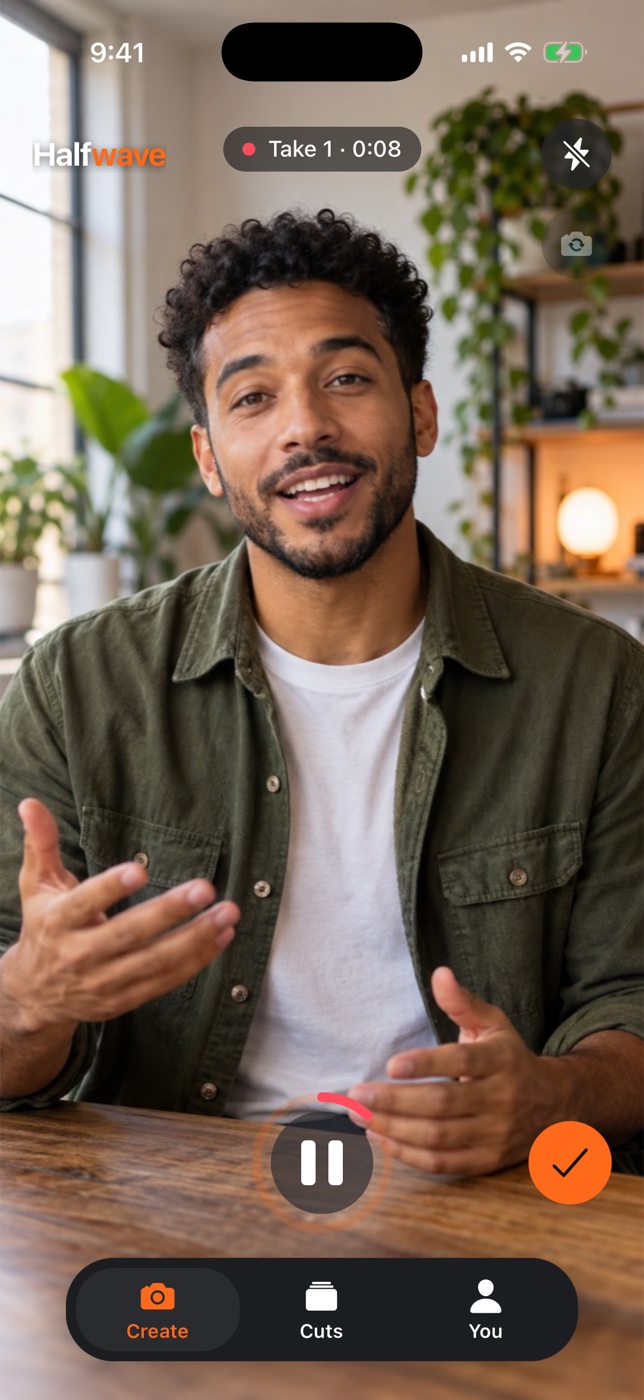
01 / RECORD
Catch an idea while it’s fresh. Record in halfwave, pause between takes, or bring a clip from your camera roll.
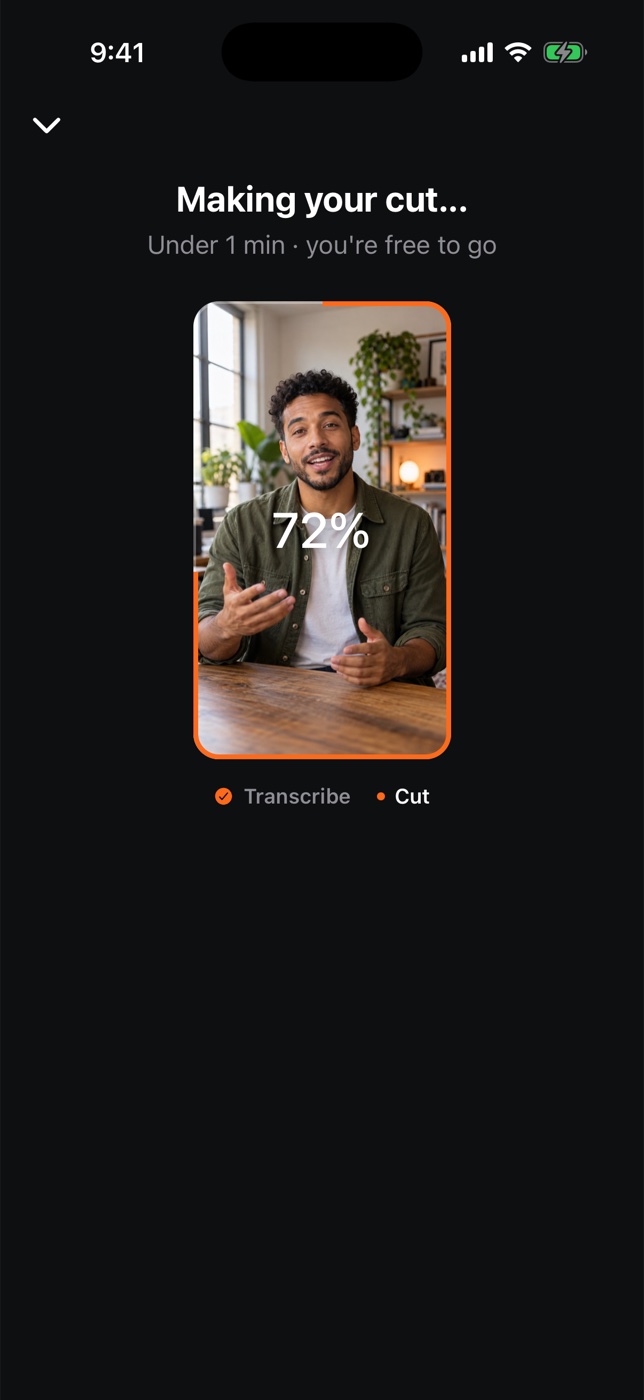
02 / AI EDIT
Choose AI-assisted editing for your footage. Follow the cut’s progress, then come back to a starting point you can make your own.
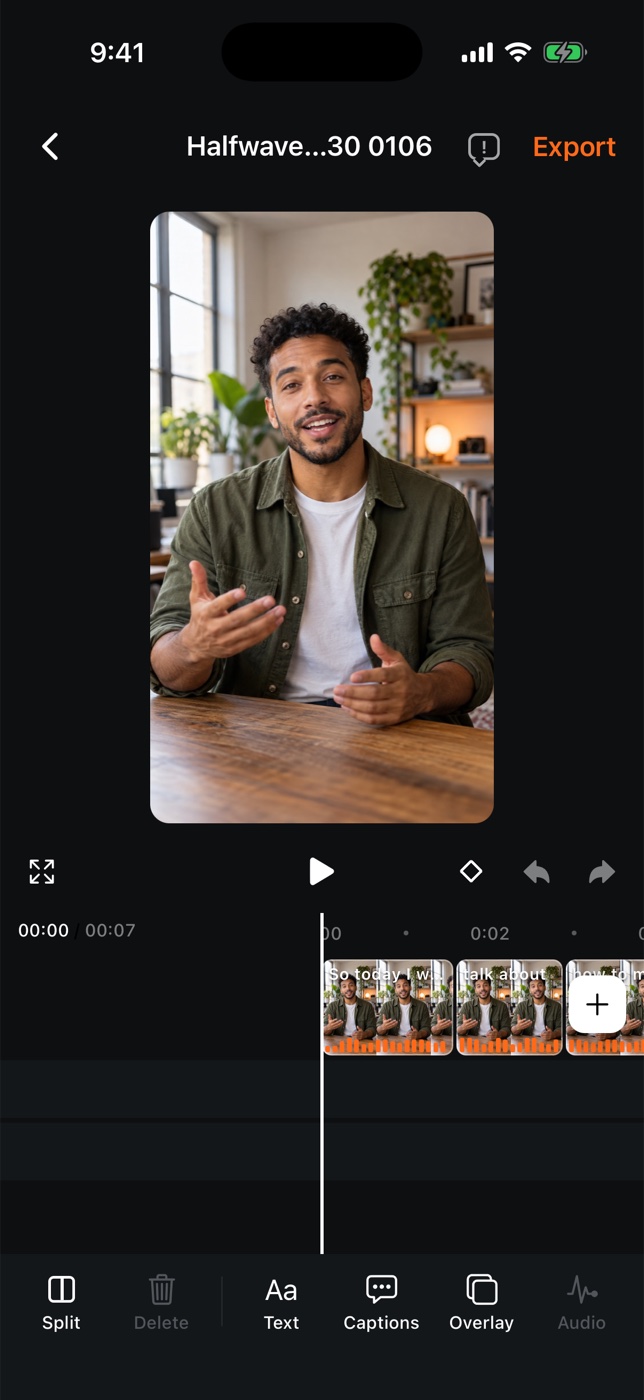
03 / REFINE
Get hands-on with the timeline. Split a clip, shape your captions, or add an image. The final creative choices stay with you.
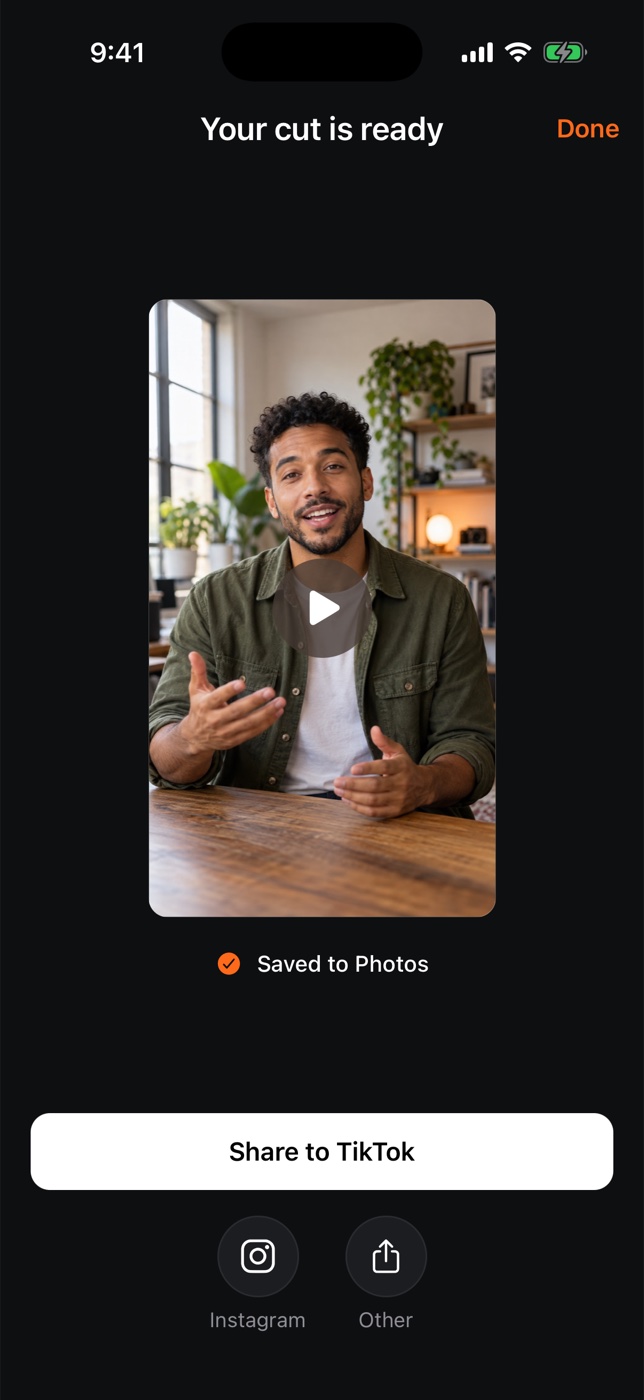
04 / SHARE
Choose your export settings and save your finished cut. Open your phone’s share sheet when it’s time to put your story out into the world.
This is a guided slideshow of actual app screenshots, not a live video editor. Use the steps or arrow keys to explore.
Your camera · Your timeline · Your story
A WORKFLOW THAT MOVES WITH YOU
Start with useful assistance.
Keep the creative decisions that make the video yours.
| Your workflow | Manual editing | AI-assisted editing | halfwave |
|---|---|---|---|
| Starting point | Your original footage | An assisted first cut | Your choice|
| Creative control | Build your own sequence | Refine the suggestions | A full timeline|
| Finishing touches | Text and image overlays | Optional auto captions | Make it your own|
| Your videos | Record or import | Choose what to process | One Cuts library|
| Final step | Preview your edit | Review the result | Export and share
Made for your processFrom first take to final cut
Choose the pace that works for you.
US launch pricing. Purchases open when halfwave launches.
For posting a few times a week.
$19.99
per month, billed monthly
For creating something every day.
$49.99
per month, billed monthly
For your most ambitious workflow.
$89.99
per month, billed monthly
Pro plan, 2 of 3
A preview of our plans. No payment is collected here.
Any trial and eligibility will be shown before purchase. Prices may vary by region.
*Unlimited AI edits are subject to fair-use and processing limits.
halfwave helps you turn recorded or imported video into a first cut, then refine it in the timeline. You can add captions, text, and image overlays before exporting.
Yes. Open the cut in the editor to split, trim, reorder, add captions, and make your own creative choices.
No. Cloud AI is optional and asks for consent before sending selected audio or a transcript to the named provider. Manual timeline editing and manually entered captions do not need cloud AI.
Yes. The export screen lets you choose the resolution and frame rate supported by your source, device, and plan.
halfwave is preparing for release on iOS and Android. This page shows the actual app with sample footage. Email jpgordon00@gmail.com to ask about early access.
Local drafts stay on your device until you upload them. Uploaded media is normally removed after 7 days once processing finishes. Save finished videos you want to keep. See our Privacy Policy for details.
Email jpgordon00@gmail.com with your device, app version, and what happened. Never send passwords or payment-card details.
Starter includes 100 AI edits each month; Pro includes 300; Ultimate has no monthly AI-edit allowance limit, with fair-use and processing limits. Paid plans include the manual editor. The prices here are planned US launch pricing; your purchase screen is authoritative.
Any available trial and your eligibility are shown on the purchase screen before you subscribe. We do not take payments or start a subscription from this preview website.
Restore purchases in the app using the same store account that subscribed. Manage App Store subscriptions through Apple, and Google Play subscriptions through Google Play. Our support page has direct links. Deleting the app does not cancel a subscription.
Bring the footage. Shape your story.
Your next great cut starts with halfwave.